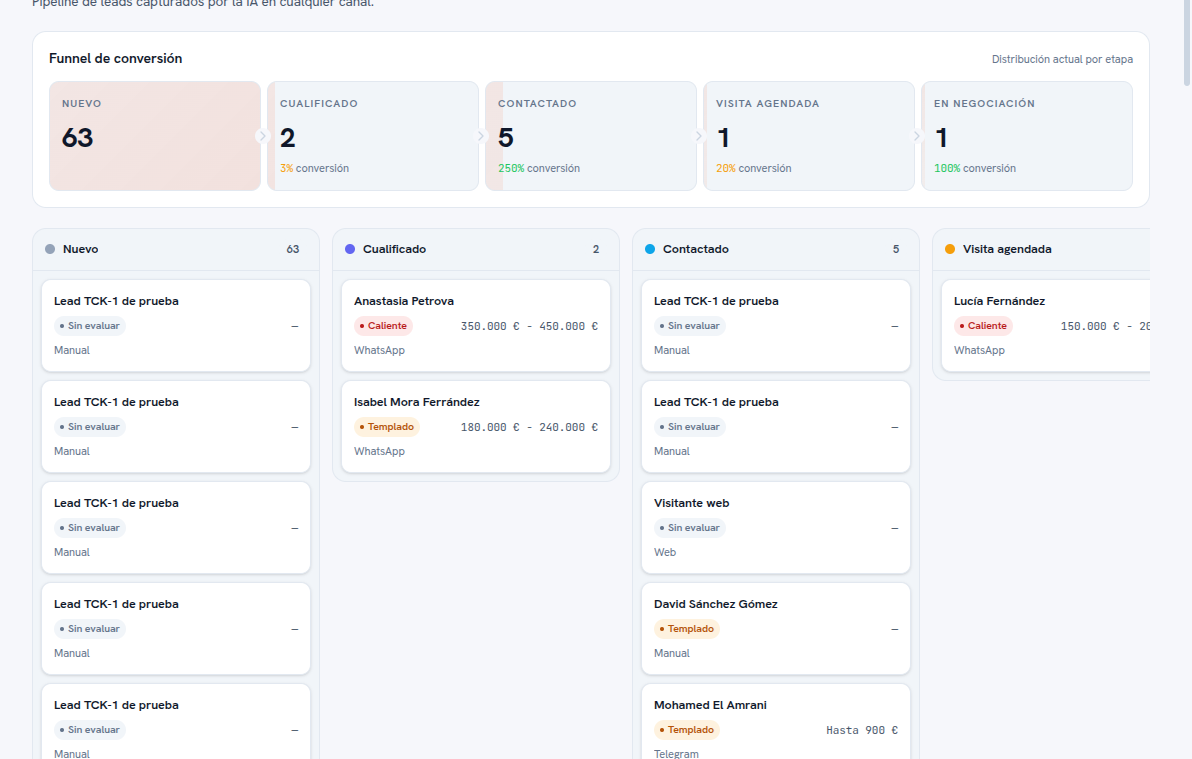
It’s the default view when you go into Leads. Before the columns, the screen always shows a header with the Conversion funnel: one card per stage with its name in uppercase, the real number of leads it currently holds (not just the ones loaded on screen) and, except for the first stage, the conversion rate relative to the previous stage. A “Current distribution by stage” link, at the top right of that header, clarifies that the numbers are as of the moment you’re looking at the screen.
Below, the board draws one column per stage of your funnel, in the order your agency defined, with the color you assigned to each one (section 3) and, in the column header, the same real lead count as in the funnel.
Each card is a lead, showing at a glance:
- The lead’s name (or “Lead + your agency’s name” if it doesn’t have its own name yet, in test leads).
- Its quality, as a colored chip: Hot (red), Warm (amber), Cold (blue) or Unrated (gray) if it hasn’t been rated yet.
- The budget, if known (or a dash ”—” if there’s no data yet).
- The source channel at the bottom of the card: WhatsApp, Telegram, Web or Manual.
On working with the cards:
- Tap a card to open the lead’s full record — the same one you’d see from the List (section 6).
- If a column has more leads than fit on screen, the “Load more” button at the bottom of the column brings the next ones.
- Moving a card between columns changes the lead’s stage: the detail is in section 4.
Warning — If your account is read-only
With the Viewer role you can see the full Board, but you can’t drag cards or change their stage. Check the inbox role matrix in manual 16 · Conversations for the rest of that role’s limits.