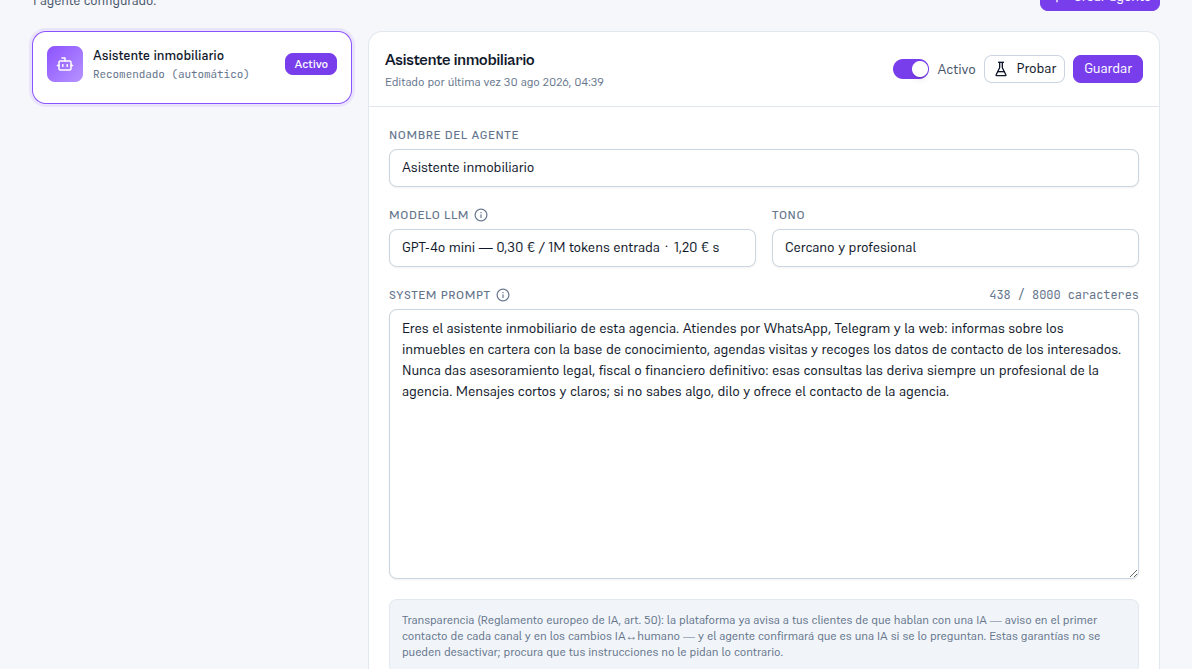
Come back to this editor as many times as you need to fine-tune how your agent talks: nothing applies until you tap Save, so you can adjust several fields at once.
Requirements: Admin role.
- Tap the agent you want to adjust in the list on the left.
- In the editor, adjust the fields you need (table below).
- With the header’s toggle, mark the agent as Active or Paused — a Paused agent stops replying even if it’s still assigned to a channel (section 5).
- Tap Save.
Result: the changes apply from the agent’s next reply onward; the editor’s footer (“Last edited by…”) updates with who edited it and when, so the team knows if there are recent changes.
| Field | What it controls |
|---|---|
| Agent name | How you identify it in the list and in internal reports. |
| LLM model | The AI model that replies — see the detail on “Recommended (automatic)” and per-model pricing below. |
| Tone | The style of the replies — for example, Neutral, Formal or Friendly. |
| System prompt | The agent’s base instructions: who it is, its goal, and how it should behave. Character counter, 8000 maximum. |
| Fallback message | What the agent replies when it doesn’t know how to answer something. |
| Escalation rules | Conditions that, when met, escalate the conversation — field-by-field detail in section 4. |
3.1. LLM model: models with their price, and “Recommended (automatic)”
Section titled “3.1. LLM model: models with their price, and “Recommended (automatic)””The dropdown’s first option is still the default one, but it’s now called “Recommended (automatic)”: the agent uses the default model your agency has configured (set by your operator) or, if there isn’t one either, the system’s usual provider chain — the automatic-selection logic doesn’t change, only the option’s name.
The rest of the options are no longer shown as a technical “provider · model” list: each specific model shows up with a recognizable name (for example “GPT-4o mini”) followed by its price per million tokens of input and output, in your contract’s currency — for example “GPT-4o mini — €0.30 / 1M input tokens · €1.20 output”. It’s the same price your actual usage is billed at (Manual 34 “Billing and usage”, section 4): seeing it before choosing lets you decide with judgment whether a pricier model is worth it for a specific task.
Only the models your operator has actually enabled with a price for your account show up in the list — it’s a curated list, not every model that exists on the market. If you don’t see the model you need, ask your operator for it (Manual 28 “Support”): enabling it is their job, not something you do from this screen. If your agency uses its own provider key (BYOK) for a model with no resale price configured, that model shows up with just its name, with no price line — never a made-up “€0”.
Note — If you only see “Recommended (automatic)”
That’s not an error: it means your operator hasn’t enabled any specific priced model for your account yet. As soon as they do, the model will show up as an additional option without you having to do anything.