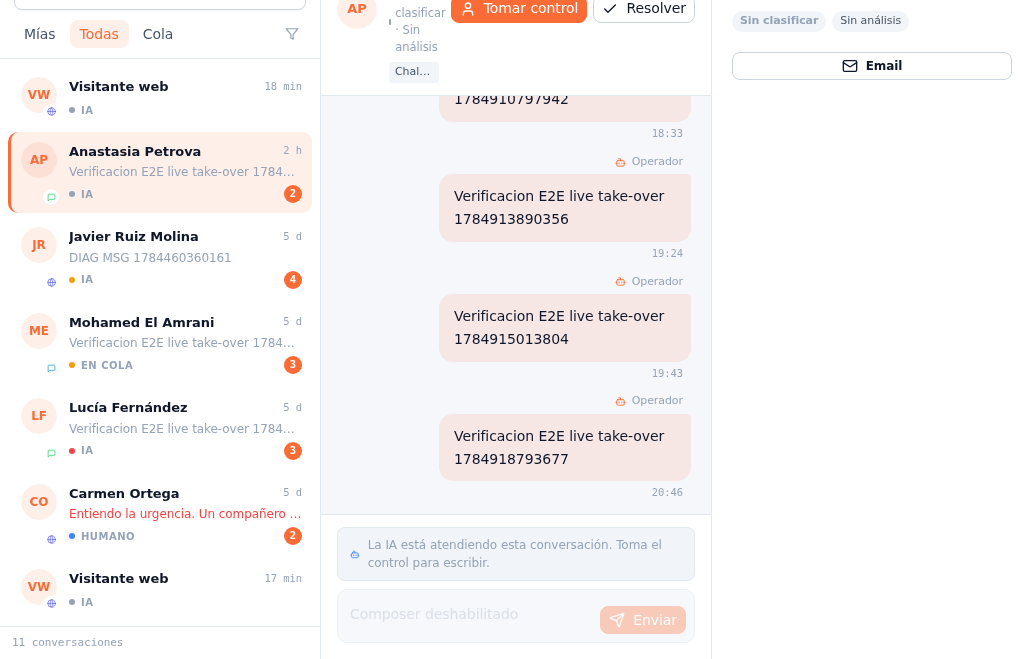
- Tap a card in the list to open it in the center column.
- Read the thread top to bottom: the visitor’s messages (or already-identified customer’s), the AI’s replies — marked with the “AI assistant” label — and, if someone has already stepped in, the team’s messages, marked with “Operator” and the name of whoever wrote them. Every message carries its timestamp.
- Check the right panel: the customer’s record with their name, their email if known (or the web visitor’s anonymous identifier if they haven’t identified themselves yet) and an Email button to write to them directly when their address is known.
The AI’s interpretations: next to the customer’s name, in the conversation header and also on their record, you’ll see a pair of tags — for example, “Unclassified” and “No analysis” while the AI hasn’t drawn any conclusion about that conversation yet. They fill in as the AI interprets the intent and quality of the contact — the same classification that later feeds the interest and quality columns on the lead (manual 17 · Leads).
Note — The conversation updates on its own
There’s no need to reload the page: new messages — from the customer, the AI, or a colleague — show up on their own in the open thread, and the mode and the unread-message badge on the list to the left update the same way, in real time.
Note — The customer already knows they’re talking to an AI from the first message
For transparency (AI Act, Art. 50), the first turn of every new conversation on WhatsApp, Telegram, web chat or Messenger prepends a short notice like “I’m a virtual assistant powered by artificial intelligence…” before the reply — once per conversation, mandatory and not something you or your administrator can turn off. You’ll see it at the start of the thread like any other AI message. Full detail in Manual 35 · Training your team on the AI system.