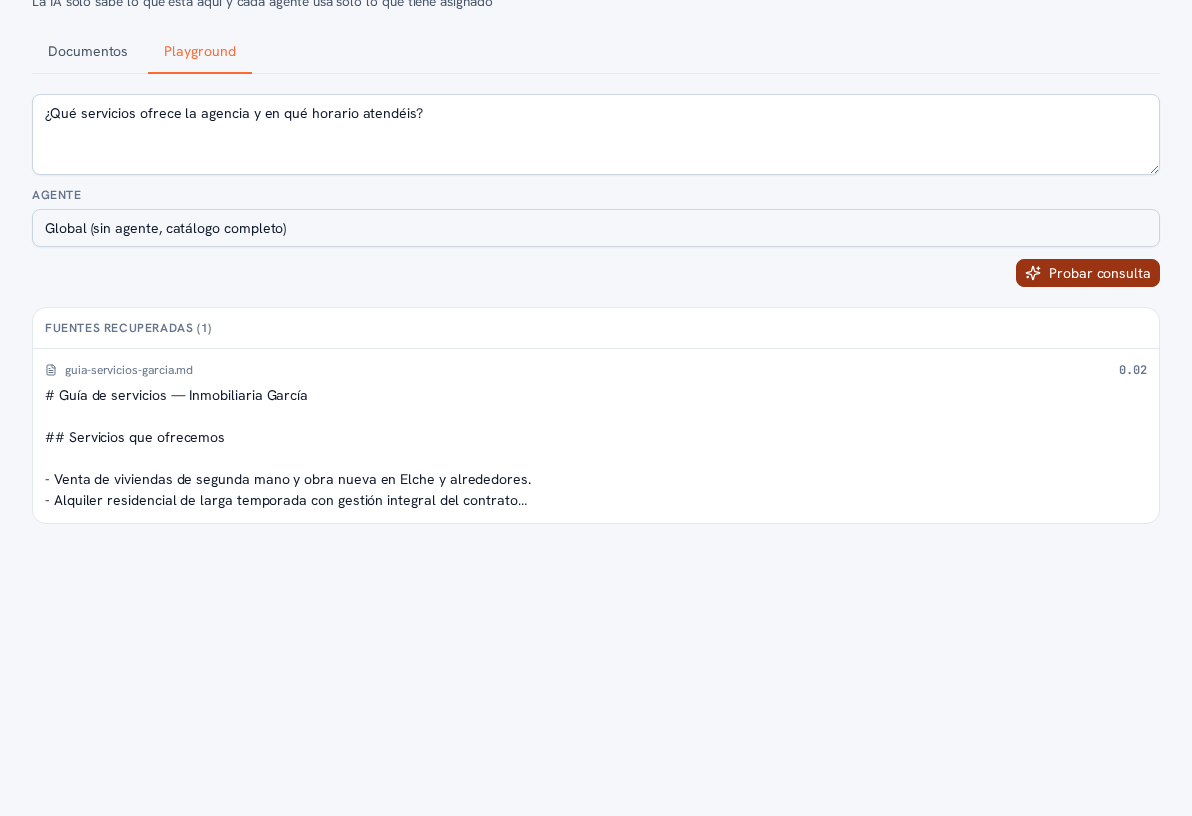
The Playground tab lets you check, before a real customer sees it, which fragments of your knowledge base the AI would retrieve for a given question. It doesn’t generate a chat reply: it shows you the exact sources — the document fragment — it would rely on. If your agency has several agents with tag-restricted access (section 3 and manual 23 · AI agents), the Agent selector lets you test the query as if you were one of them, to check exactly what each one would see.
Requirements: having at least one document uploaded and processed for the test to make sense (with an empty knowledge base, there’s nothing to retrieve).
- Go into Knowledge base and tap the Playground tab.
- Type an example question, as if you were one of your customers.
- In the Agent selector, choose “Global (no agent, full catalog)” to test against every document, or a specific agent to check exactly what that agent would see based on its tags.
- Tap “Test query”.
Result: the “Retrieved sources” panel lists the document fragments retrieved for that question and that agent (or the full catalog), with the source document’s name and the retrieved text itself — so you can verify, before the question actually arrives over WhatsApp, Telegram or the web chat, exactly what information the AI would use to answer, and quickly spot if a document is missing a tag it should have.