
Skip to content

Operate

Procedure: create a contact manually

Requirements: administrator or editor role.

  1. Tap ”+ New contact”, at the top right.
  2. Fill in the full name (optional).
  3. Fill in the phone — required: choose the country in the prefix dropdown (searchable) and type the national number, without the prefix, in the field next to it.
  4. Fill in the email (optional).
  5. Check the “Country (optional)” field: it’s auto-suggested from the country you chose on the phone, but you can change or clear it — unlike the phone, it’s never required.
  6. Confirm the creation.

Result: the contact is created with “Manual” source and shows up instantly in the table.
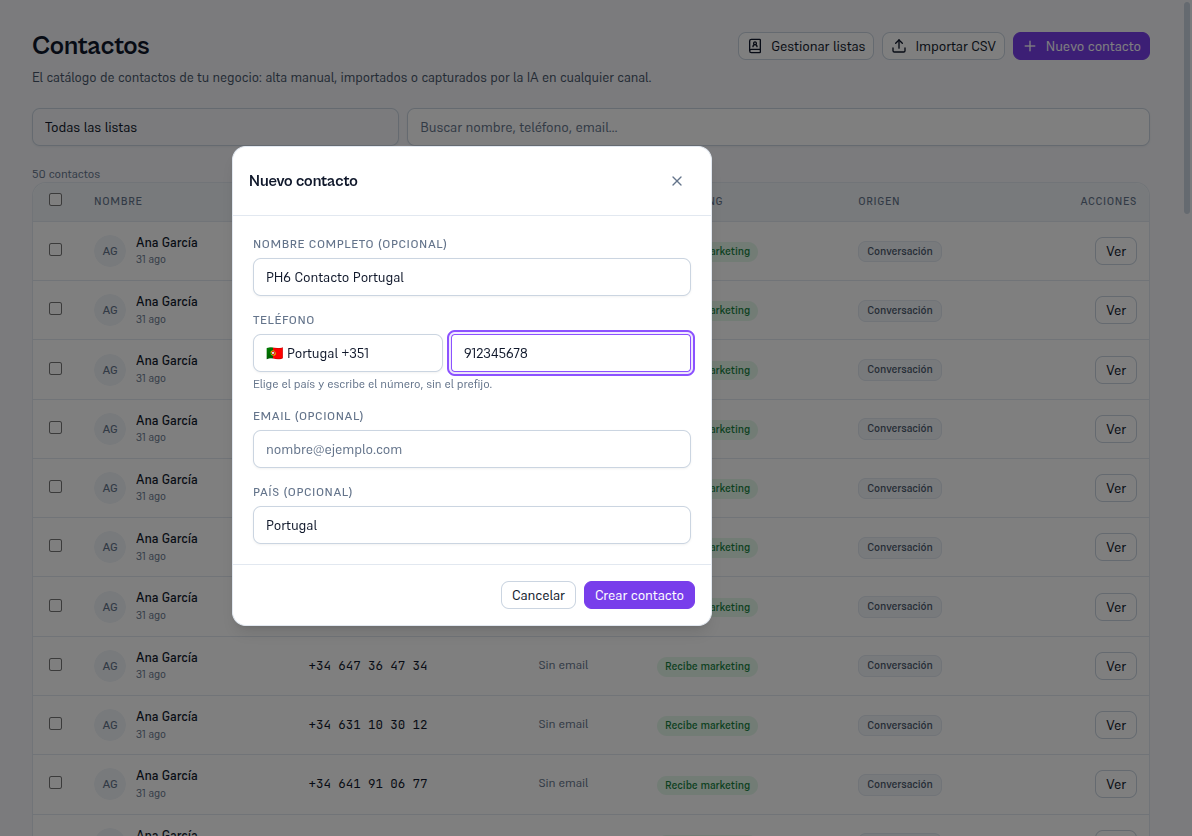
New contact modal with Full name (optional) filled in, Phone with the Portugal +351 country-prefix dropdown and the number 912345678, the help text "Choose the country and type the number, without the prefix", empty Email (optional), and Country (optional) auto-filled with "Portugal" from the chosen prefix