
Skip to content

Launch

Procedure: connect Telegram

Telegram connects with a bot token created with Telegram’s BotFather — the Telegram bot that lets you create bots by chatting with it.

Requirements: administrator role; a bot already created on BotFather, with its token copied.

  1. On the Telegram channel’s card, tap Connect.
  2. When the connection wizard asks for it, paste the bot’s token.
  3. Confirm to link it.

Result: the channel is left Connected, with the bot’s username (for example @bot_not_connected switches to showing the real bot) visible in the card’s “Bot” field.

Just like WhatsApp, you can repeat “Add channel” (section 3) to connect several bots — each with its own name, agent and owners.
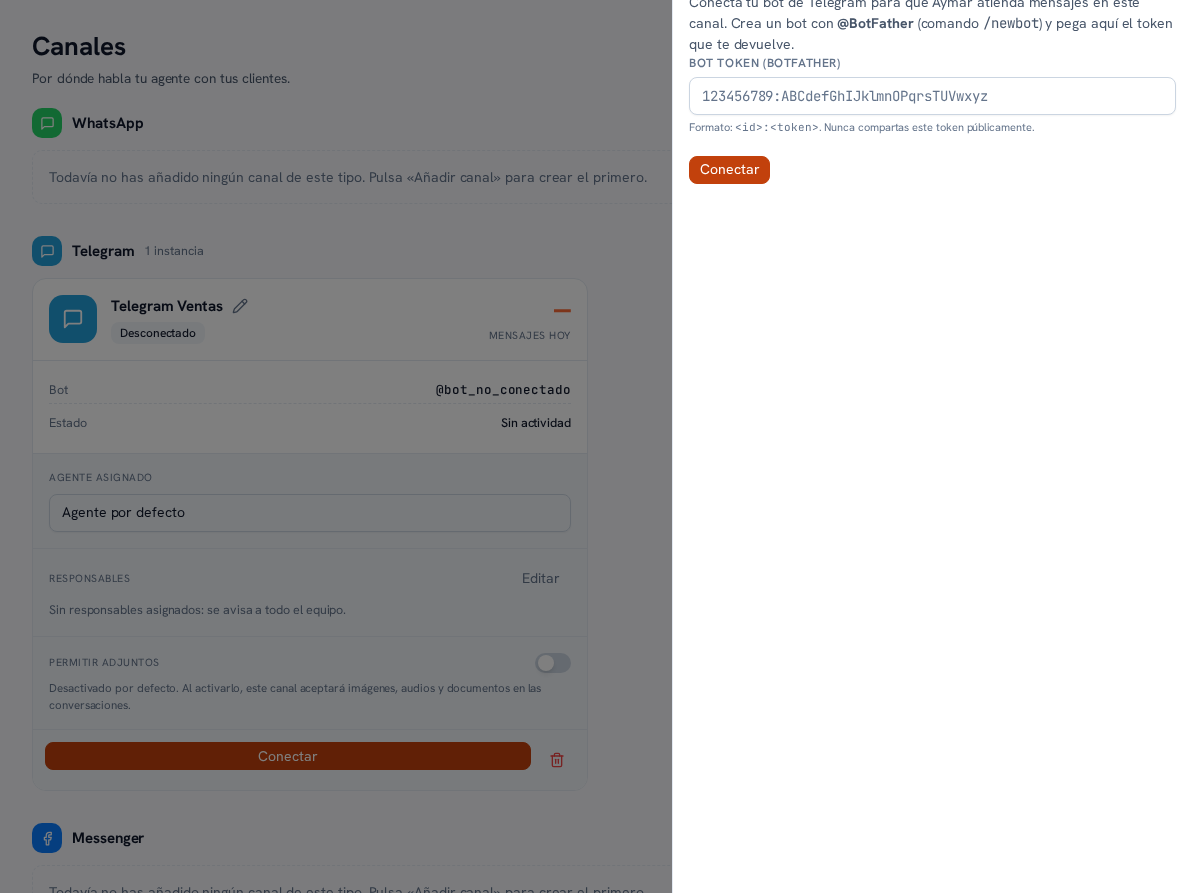
The "Connect Telegram" panel for a freshly created channel: instructions to create the bot with @BotFather (the /newbot command), the text "Connect your Telegram bot so your assistant can handle messages on this channel", the "Bot token (BotFather)" field with the id example format, the warning not to share the token publicly, and the Connect button