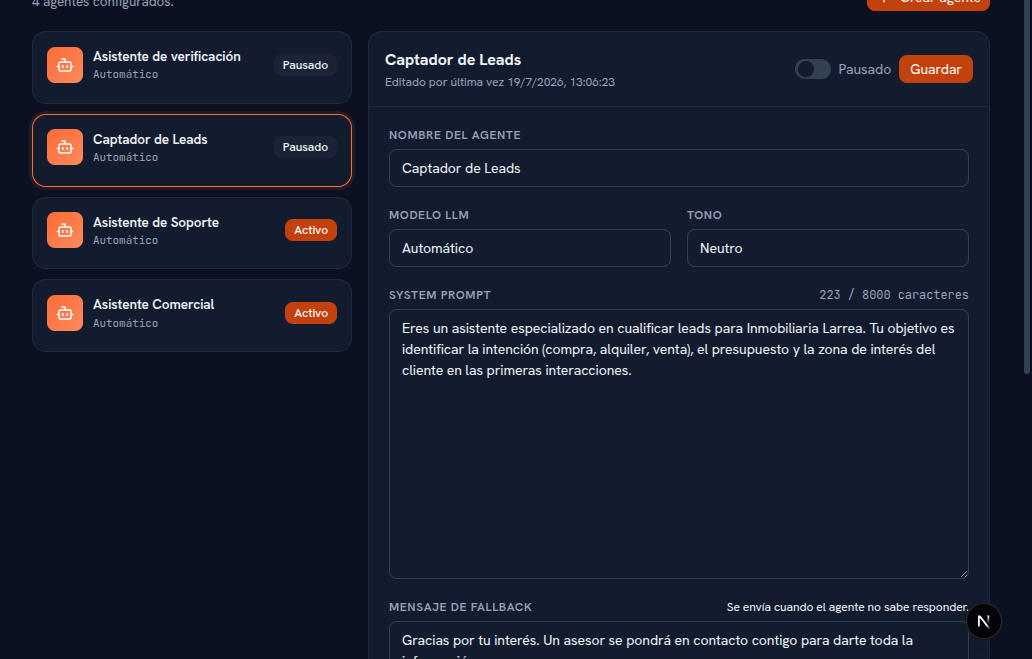
An AI agent is who talks with your customers on your behalf over WhatsApp, Telegram and your website chat: it understands what they ask, replies with the information you gave it and, if needed, hands the conversation off to someone on your team. Everything that decides how it behaves is configured from the AI agents screen, in the sidebar.
Your instructions don’t start from zero. When you signed up your account (Manual 22 · Account sign-up) you chose a business type, and with that the Platform already created you a first agent adapted to your sector, with access to everything you’d upload and a web channel ready to embed — that’s the foundation the platform lays down. From there, you add your own: from this screen you adjust its name, its tone, its instructions (the system prompt, section 3), what it replies when it doesn’t know something, when it should escalate a conversation (section 4) and which documents, templates and connections it can use (section 6). You can create as many agents as your agency needs — one for sales and another for rentals, for example — and assign each one to the channels you want (section 5).
The screen has a master-detail layout: on the left, the list of configured agents, with their name, model and status (Active or Paused); on the right, the full editor for whichever agent you’ve selected.