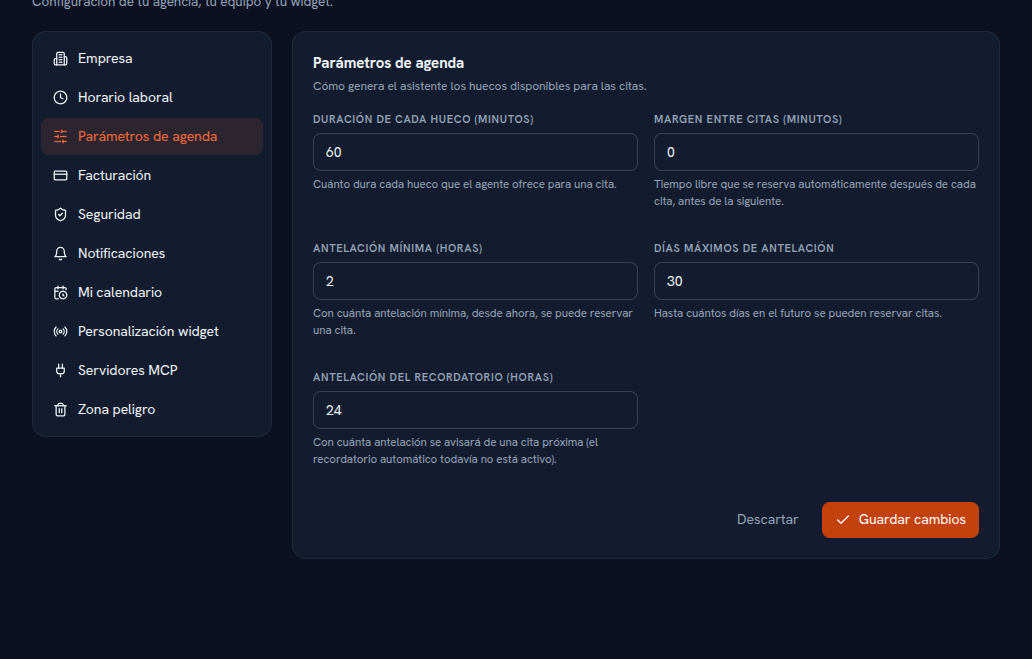
Alongside business hours, this section sets the numeric values the Calendar’s availability engine uses to calculate which slots to offer for an appointment.
Requirements: Admin role.
- Go into Settings → Calendar parameters.
- Adjust the fields you need (table below).
- Tap Save changes.
Result: the Calendar recalculates the slots it offers with the new values from the next query on.
| Parameter | What it controls |
|---|---|
| Slot duration (minutes) | How long each slot the agent offers for an appointment lasts. |
| Buffer between appointments (minutes) | Free time automatically reserved after each appointment, before the next one. |
| Minimum notice (hours) | How much minimum notice, from now, an appointment can be booked with. |
| Maximum days ahead | How many days into the future appointments can be booked. |
| Reminder lead time (hours) | How much notice would be given before an upcoming appointment — see the note below. |
Note — The automatic reminder isn’t active yet
The screen includes the “Reminder lead time” field, but automatically sending appointment reminders isn’t active yet — the interface itself says so right next to the field.
Exactly how slots are calculated from these values and business hours, the Calendar’s List and Week views, and how each person connects their personal calendar (including the shared-account pattern for a single agency calendar) is covered in full in Manual 19 · Calendar.