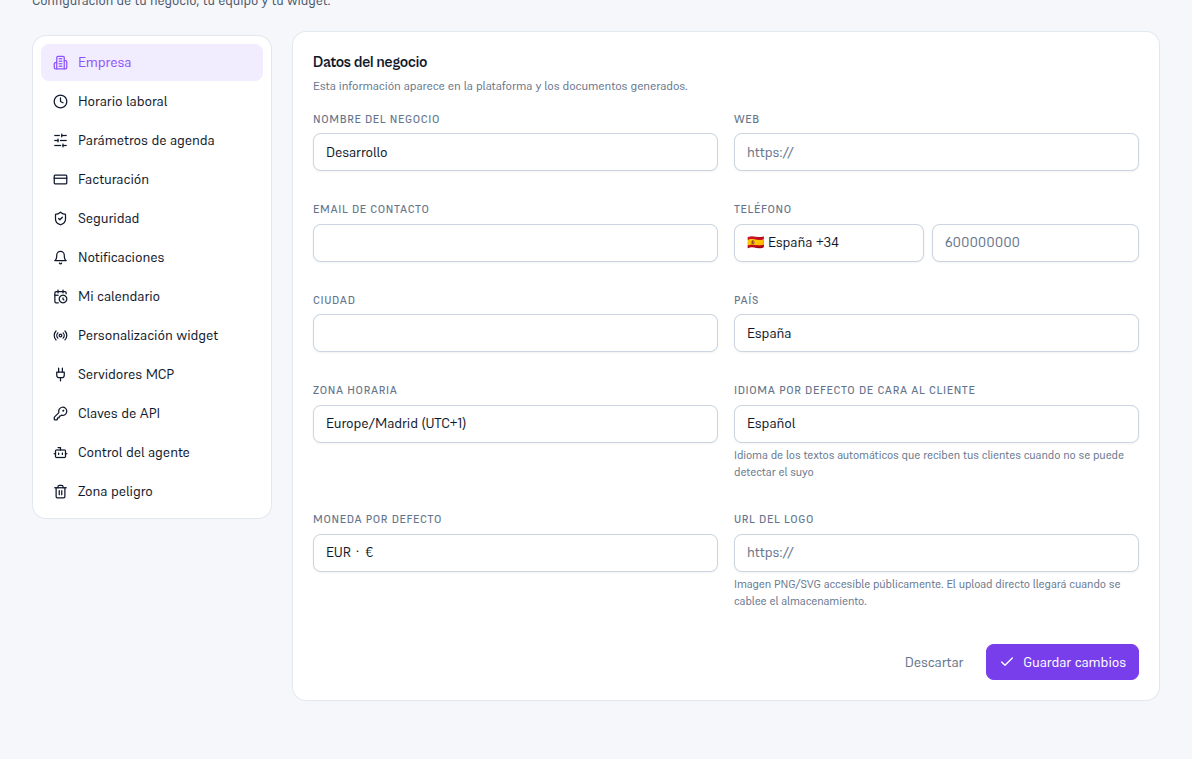
It’s the section that opens by default when you go into Settings. This information shows up on the Platform and on documents generated for your customers.
Requirements: Admin role.
- Go into Settings → Company.
- Fill in the fields you need (table below).
- Tap Save changes (or Discard to undo what you’ve typed without saving).
Result: the details are updated instantly on the Platform and on any new document generated from that moment on.
| Field | What it is |
|---|---|
| Agency name | Your business’s name, as it shows up on the Platform. |
| Website | Your website’s URL. |
| Contact email | Your agency’s public email. |
| Phone | Your agency’s contact phone: a country/prefix dropdown (searchable, with flag and prefix visible) plus the national number in a separate field. |
| City | The locality where your agency operates. |
| Country | Your agency’s country — a dropdown with the same catalog as Phone’s. It’s filled in on its own when you register (Manual 22) from the country you chose on your phone; you can change it here at any time. |
| Time zone | For example, Europe/Madrid (UTC+1); used for your hours and for the time your team sees on the Platform. |
| Platform language | The language you see the Platform’s menus and text in (Spanish, among others). |
| Default currency | For example, EUR · €. |
| Logo URL | The link to your logo image — see the note below. |
Note — The logo is provided via URL
The “Logo URL” field expects the link to a PNG/SVG image that’s already published and publicly accessible. Direct upload of the file from your device isn’t available yet — it’ll arrive once file storage is wired up; until then, host your logo wherever you already have it published and paste its link here.