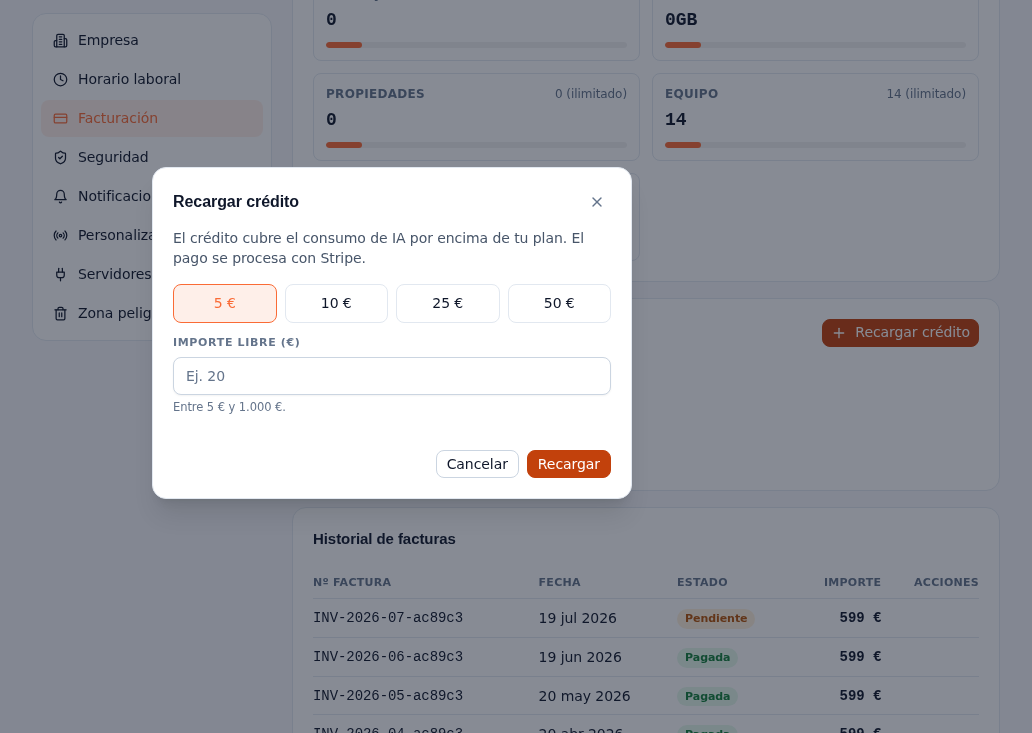
Consumption credit is an internal wallet from your provider, separate from your subscription: it covers only conversations above your plan (the Messages axis from section 5 — AI tokens aren’t covered by credit, they have their own quota and extension, section 6). Your monthly subscription is always paid in full via Stripe; credit never replaces or prorates that fee.
Requirements: Administrator role.
- On Settings → Billing, in the Consumption credit panel, tap Top up credit.
- In the dialog, choose one of the preset amounts (5, 10, 25 or 50 in your contract’s currency — section 1; you’ll see € or $ as applicable) or type a free amount between 5 and 1,000 in that same currency, in the “Custom amount” field.
- Tap Top up: a one-time payment Stripe Checkout opens (it isn’t a new subscription).
- Complete the payment on Stripe.
Result: your balance updates as soon as Stripe confirms the payment — never before. Below the available balance, the transaction history (up to 50) shows each Top-up, Usage (overage automatically deducted) or Adjustment (manual, made by your provider’s team), with its date, reason if it has one, and signed amount. Your balance never goes below zero — there’s no credit debt.
Note — Without Stripe configured
The dialog opens the same way, but on confirming you’ll see the honest notice “Payments aren’t available yet: Stripe isn’t configured in this environment” instead of a simulated charge.