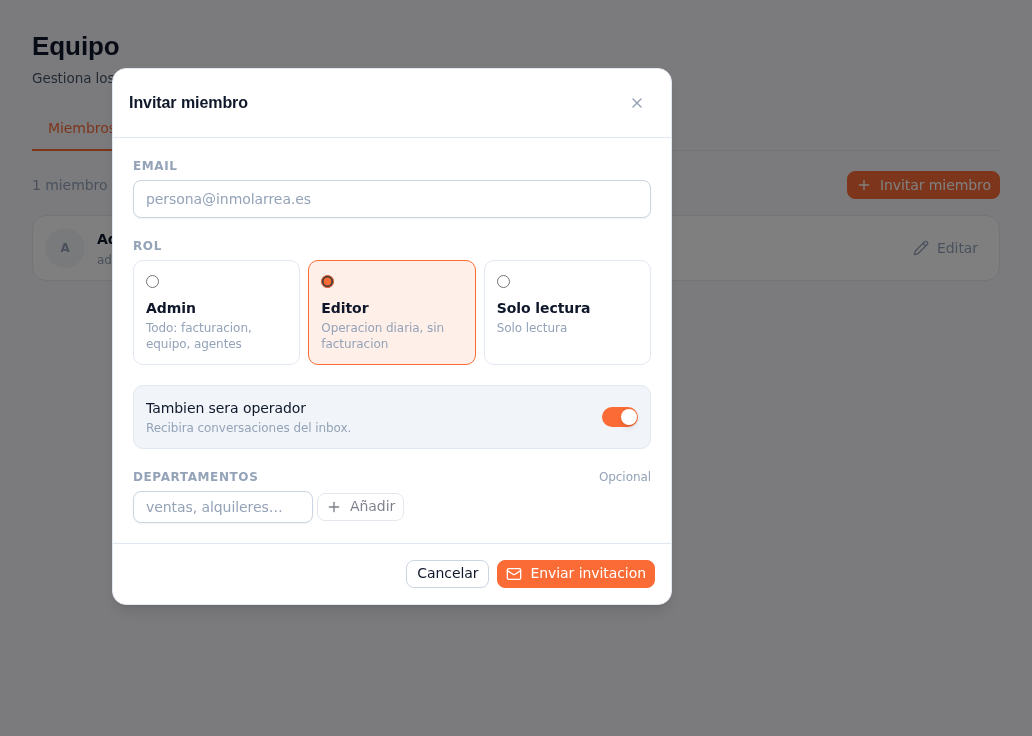
Requirements: administrator role — only administrators can invite members.
- On the Members tab, tap ”+ Invite member”.
- Type the person’s email.
- Choose their role, among three selectable cards:
- Admin — “Everything: billing, team, agents”.
- Editor — “Day-to-day operations, no billing” (checked by default).
- Read-only — “Read-only”.
- Turn on “Will also be an operator” if they’re going to receive inbox conversations — the toggle is on by default. With it on, you can type a department (for example “sales” or “rentals”) in the field below and tap ”+ Add”; repeat for every department you want to associate with them. The department field is marked optional.
- Tap “Send invitation”.
Result: the invited person receives an email to join. While they haven’t accepted, their invitation stays listed on the Invitations tab.